

A warning appears when launching timeline export
- Export
A warning appears when launching timeline export
FAQ ID:000038310 | Date:2026/11/05
From EDIUS 11.51.22591 or later, if incomplete render file exists for the timeline to be exported, a warning message will appear. The operation performed depends on the button selected, as shown in the table below.
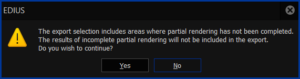
| Button | EDIUS behavior |
| Yes | EDIUS exports the timeline without using incomplete render file. |
| No | Timeline export will be cancelled. |
When export is cancelled
If you click [No], follow the steps below for correct timeline export:
1. Complete the render file creation job.
1) Open Job Monitor and confirm whether incomplete job exists.
| Ongoing job | Wait for completing the job. |
| Paused job | Resume and wait for completing the job. |
2) Once the job completed, launch timeline export.
2. If there is no ongoing / paused job, launch timeline export. If the message appears again, click [Yes] to launch timeline export.
MENU
- About EDIUS
- License
- Way to retrieve EDIUS serial number
- An error occurs while activating VisTitle license
- Way to gather license information file
- Offline license activation/deactivation stops midway
- EDIUS / Mync: Listed license cannot be removed from GV License Manager (#411C error)
- Things to consider when uninstalling EDIUS 11.50
- Steps to confirm server certificate
- Way to manage VisTitle license
- 0x800CE1A error appears when validating the license
- Replace EDIUS license from Trial to Product license
- Specification
- Different versions of EDIUS on the same PC
- EDIUS 11: Notes on performance improvement of project loading
- GPU hardware acceleration for preview and timeline export
- EDIUS X supported file formats
- Functional differences between EDIUS X Pro and Workgroup
- EDIUS proxy clip compatibility
- Notes on upgrading to EDIUS X
- EDIUS project file compatibility
- Windows 11 compatible information
- EDIUS X system requirements
- Installation
- .NET Framework installation fails
- Steps to upgrade VisTitle Express build
- Resolved - EDIUS installation fails on February 29
- Way to reinstall EDIUS to resolve the issue of not running EH services
- EDIUS / Mync: Way to identify GV License Manager build number
- EDIUS 11 Broadcast: An option to install EDIUS without Mync installation
- Mync is unavailable after upgrading EDIUS 11 Broadcast build
- Silent installation of EDIUS / Mync / Hub / Floating License server
- Things to consider when uninstalling EDIUS 11.50 or later
- Windows Defender SmartScreen prevents running EDIUS installer
- Starting-up
- EDIUS does not start
- EDIUS fails to start with AMD GPU
- EDIUS fails to start by no progress of 'initializing asset repository'
- EDIUS 11: "Synchronizing" dialog appears when opening a project
- EDIUS 11 fails to open some of projects saved with old generations of EDIUS
- Way to start EDIUS without migration of older version's settings
- Error starting EDIUS, Failed to communicate with the service
- Configure EDIUS on first time starting
- Start editing video
- Starting fails / Not found EH service error appears
- View
- Project Settings
- Clip
- Long duration clip placed onto the timeline
- Steps to regenerate proxy clip
- Notes on changing frame rate value in clip properties
- "Codec type not supported" error appears when loading Blackmagic RAW clip
- Cannot load .CR3 clip in EDIUS
- EDIUS / Mync is unable to load HEIC file
- Can I edit a clip shot by 360 degree camera ?
- EDIUS becomes unstable with 11th Gen Intel Processor and NVIDIA GPU
- EDIUS may freeze while decoding H.264 or 265 clip on 12th Gen Intel Core processor
- EDIUS rejects loading a file
- Import / Capture / Data migration
- How to use the Input Preset menu
- Captured clip is split into multiple clips
- Input timecode does not appear while video capture
- Troubleshooting of transferred clip to be offline
- EDL import fails in EDIUS
- Mync 11: Steps to restore offline assets
- EDIUS / Mync is unable to load HEIF file
- EDIUS cannot import a DVD
- Create capture device preset
- Generic troubleshooting for issue of capture via video I/O hardware
- Operation
- Clips are off-line in EDIUS project when loading project on another client
- Import / export does not work from / to P2 card
- About auto recovery of corrupted project Bin
- EDIUS 11: Troubles when importing MP4 or MOV files or Proxy Originated Editing
- Proxy Stuttering/jerking on EDIUS XS
- Asset Store database migration on updating EDIUS X / 11
- EDIUS 11: Not working the Bin with STATUS_STACK_BUFFER_OVERRUN error
- "Synchronization of project and database" appears while loading a project
- EDIUS 11: Audio editing response is very slow while modifying rubber band
- An error occurs when running multicam audio sync
- Effect
- Cannot apply a clip transition
- Cannot use GPUfx transitions
- EDIUS 11: Way to install VisTitle Express
- GPU transition tree doesn't appear in Effect Palette
- EDIUS 11 New Feature: Auto color correction
- EDIUS 11: Compatible third party effect plug-in
- EDIUS 11: VST 3 plug-in support
- EDIUS 11: Steps to activate VST 3 plug-in
- EDIUS X: Compatible third party effect plug-in
- Third party plug-in compatibility by EDIUS versions
- Title
- Quick Titler cannot import a text file
- Title text is fuzzy in Quick Titler
- QuickTitler works slowly when creating a title clip in *.etl2 format
- EDIUS 11: Support speech to text
- Titler Pro clip becomes offline in EDIUS X timeline
- EDIUS QuickTitler window is invisible
- Typed first Chinese character doesn't appear in QuickTitler
- QuickTitler text unexpectedly changes / disapeears when loading a title in another PC
- Switch QuickTitler default format
- Audio
- Audio waveform does not appear in the timeline
- Audio distortion occurs when playing 32bit depth audio clip
- How to reset default destination of voice over audio file?
- Acon Noise reduction at the beginning of a clip is not applied
- Audio normalize does not proceed
- Audio normalize context menu is inactive
- Setup Storm 3G Elite USB audio
- Export
- EDIUS unable to print to tape
- An error appears when printing to H.265 clip on EDIUS 9
- How to export XDCAM MXF single clip in EDIUS?
- Timeline export fails if project has thousands of clips
- 'Add to Bin' does not work when using default exporter
- H.264/H.265 export using "Use Hardware Encoder" option fails
- New encoder selection UI on H.264/AVC and H.265/HEVC exporter
- EDIUS 11: NVIDIA GPU hardware encode support
- EDIUS 11: NVIDIA GPU is not detected for hardware video encoding
- Exporter preset does not preserve the destination path
- Hardware
- GV video hardware cannot be used
- Steps to preview a video on installed video hardware
- AJA Control Panel does not start
- Backup / restore hardware device preset
- Third party video hardware tested with EDIUS X
- Third party video hardware tested with EDIUS 9
- Color belt appears on video monitor connected to AJA hardware
- Color bar appears on connected video monitor after signing onto the Windows
- Use video hardware while inactive of EDIUS
- How to setup third party video hardware?
- Others
- EDIUS 11: Reset Chorus Hub in editing client
- Does EDIUS delete asset store database on upgrade or downgrade?
- Check for updates fails
- Way of resetting Chorus Hub on Chorus Hub ecosystem
- Editing with NVDEC causes inoperable of EDIUS and OS
- Confirm running status of EDIUS HUB services
- Reset EDIUS settings to software default
- EDIUS freezes / crashes
- WER dump is not generated when crashing EDIUS application
- User Settings
- eID (EDIUS ID)
- Way to change eID password
- Way to reset eID password
- How I can discover my eID?
- How to reset my eID password?
- An error occurs when logging into eID (EDIUS ID)
- About eID (EDIUS ID)
- Replace to another eID
- Steps to create eID
- Way to link license to eID on subsequent running of EDIUS
- I cannot create eID (EDIUS ID)
- Environment Settings
- Way to force dispatch Intel integrated graphics to EDIUS application
- GV Render Engine ignores proxy server settings for the LAN
- EDIUS fails to import from / export to ftp servers
- EDIUS supports to preserve preview quality
- TCP ports used by EDIUS Floating License Server
- Configure GV License Manager to find the floating license server manually
- EDIUS 11: Support renaming profile folder
- Configure default project name in EDIUS 11
- I can't monitor audio on PC speaker
- Configure GV License Manager to show license expiration warning
- Editing Configuration
- Disc Burner
- FAQ Archives
- HDV/DV tape I/O does not work
- Preparation for HDV/DV tape I/O
- Unable to import / export still images
- Help cannot be opened
- Help menu does not appear
- Video scope does not work in EDIUS 9
- About After Effects Plug-in Bridge support
- "Not implemented" error appears while exporting to XAVC S
- EDIUS 8 / 7: How to setup 3rd party hardware?
- EDIUS 8 Third party hardware support
- Rendering